Google Play Closed Testing: 12 Testers, 14 Days
New personal Play accounts need a closed test with 12 testers for 14 days before production. Here's how to run it for an AI-built game, and how to find the testers.
You built a game, exported a build, opened the Play Console — and hit a wall: production is locked until you run a closed test. Google Play closed testing with "12 testers for 14 days" is the gate most new indie publishers meet, and it applies no matter how the game was made.
This guide explains the rule in Google's own terms, gives you a checklist that works for an AI-built Android game, and covers the part everyone struggles with: finding twelve real testers.
Why closed testing shows up before you can go live
Play Console offers several testing tracks that let you widen your audience gradually.
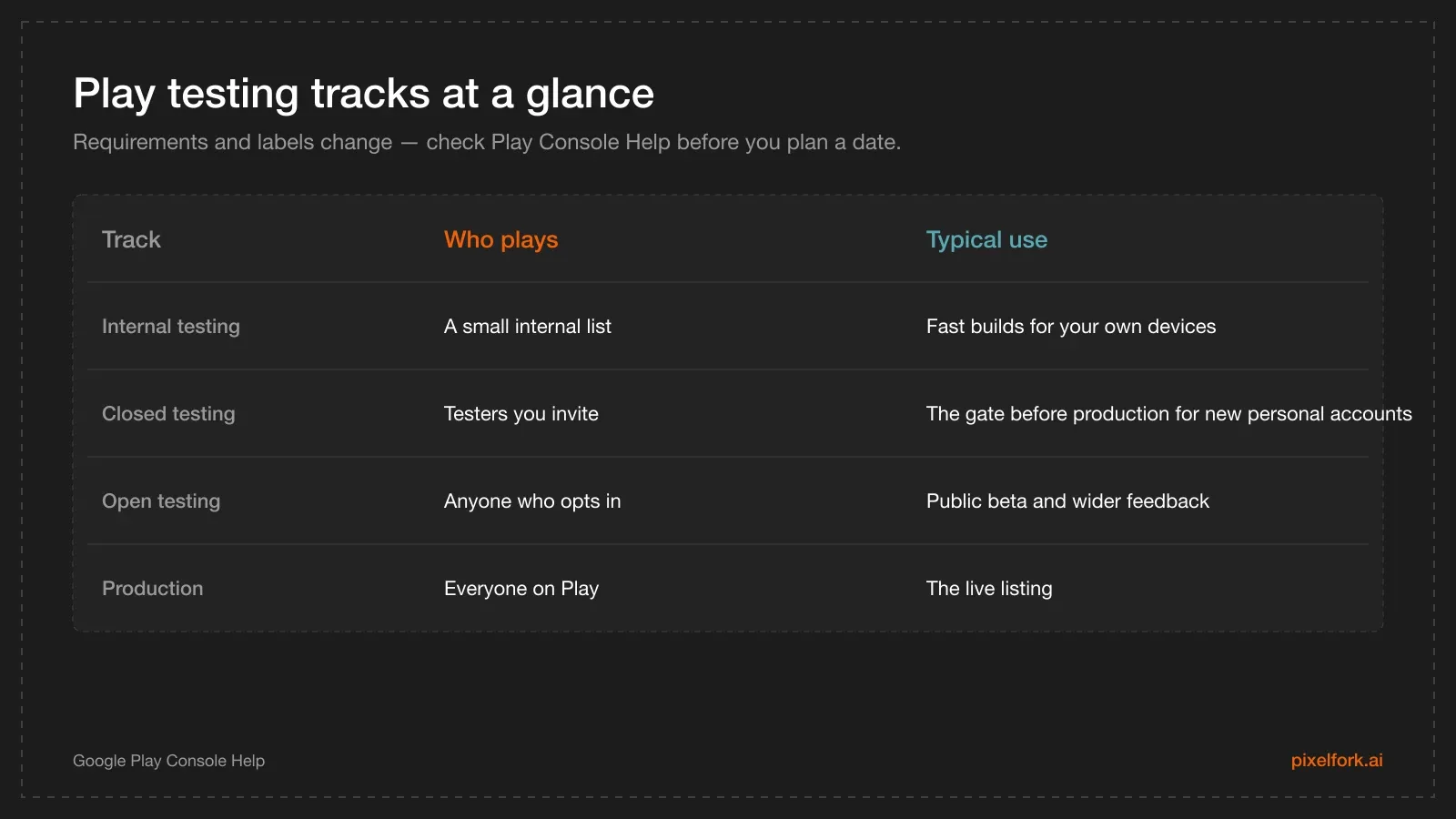
Testing tracks, from your own devices to the public listing.
Testing tracks are about quality and policy, not about your toolchain. Unity, Godot, a hand-written engine or an AI game maker — the process is identical, and the AAB you upload is just a file.
The "12 testers, 14 days" rule, accurately
Here's the current wording from Play Console Help: Google requires personal developer accounts created after 13 November 2023 to run a closed test with a minimum of 12 testers who have been opted in continuously for at least 14 days. Once you meet that bar, you can apply for production access from the Play Console dashboard, answering questions about your app's design, your testing process and production readiness (App testing requirements for new personal developer accounts).
Three things worth underlining:
- It applies to personal accounts, created after that date. Organisation accounts follow a different path.
- "Continuously opted in" is the tricky part. If testers leave the program, your window can restart. Ask people to stay opted in until you tell them you're done.
- Policies change. Treat every number in this article as "true at the time of writing" and confirm on Google's page before you plan a launch date.
An AI-built game gets no shortcut here, and no penalty either. Google reviews what the app does, not how you made it.
End-to-end checklist for an AI-built game
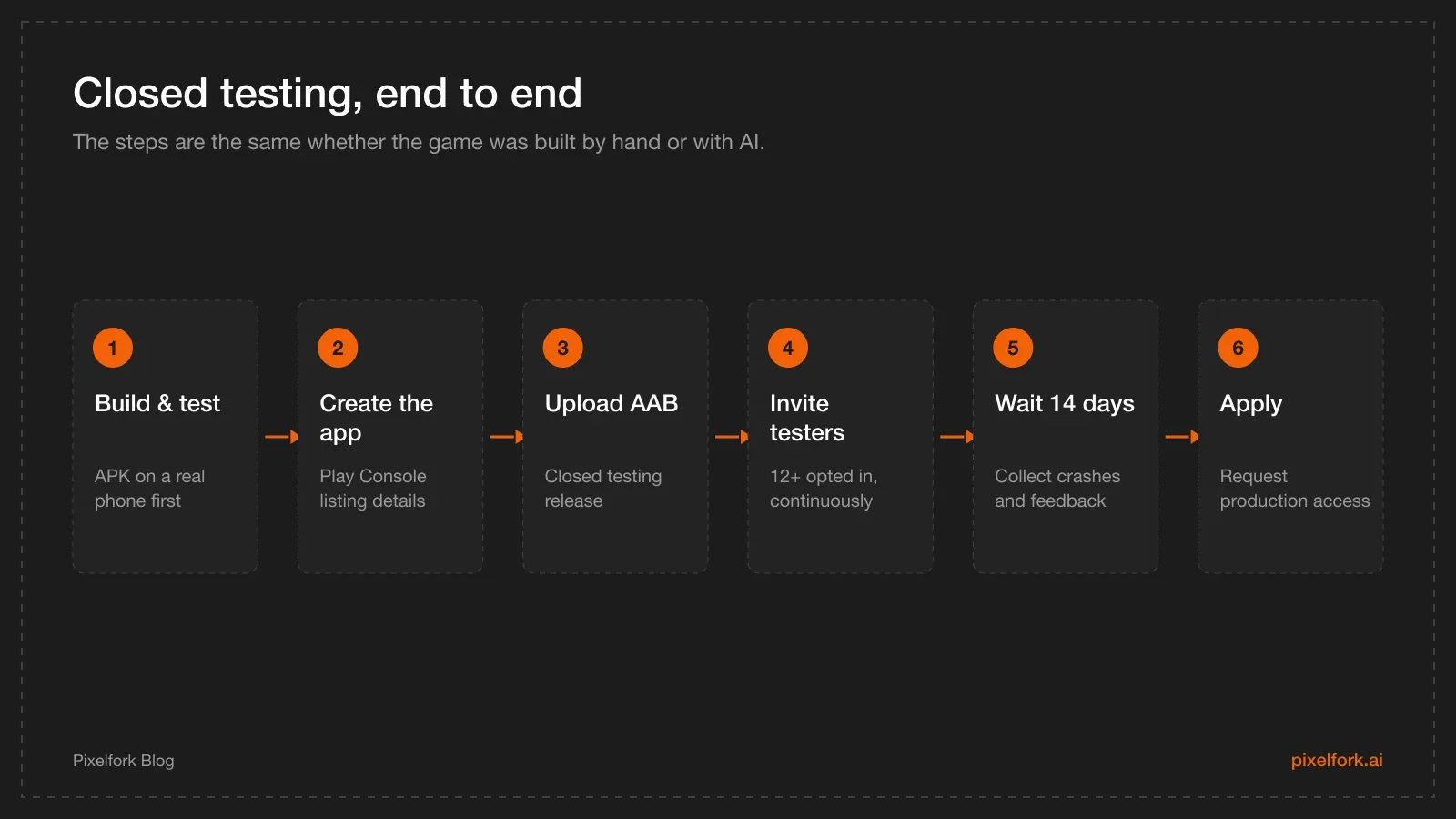
The sequence that avoids wasted Console releases.
- Build for Mobile / Tablet and get the loop right. Fix feel before packaging; every rebuild after upload costs you time.
- Export an APK and test on real hardware. Borrow an older phone if you can. This is where first-launch crashes, tiny touch targets and unreadable text show up.
- Export an AAB (APK vs AAB if you're unsure which is which).
- Create the app in Play Console and complete the store listing: title, short and full description, screenshots, feature graphic, icon, category, contact details and a privacy policy URL.
- Answer the policy questionnaires: content rating, target audience and content, data safety, ads declaration, government-apps and news declarations where relevant.
- Create a closed testing release, upload the AAB, add release notes, and set up your tester list (email list or Google Group).
- Share the opt-in link, keep at least 12 testers opted in for 14 continuous days, then apply for production access.
How to recruit 12 real testers without an audience
This is the part that blocks most solo developers. Some approaches that work:
- Friends and family with Android phones. Twelve is fewer than it sounds — ask 20 people to be safe.
- Indie and game-dev communities. Discord servers, subreddits and forums often have tester-swap threads: you test someone's game, they test yours.
- Your own players. If you already shared a playable web link, the people who replied with feedback are your warmest testers.
- Local meetups, classmates, colleagues. In person, an opt-in link and a QR code take thirty seconds.
Make it easy: send the opt-in link, a one-line install instruction, and exactly three questions ("Did it launch? What confused you in the first minute? Did anything look broken?"). Set expectations that the test runs two weeks and they should stay opted in until then.
What AI-built games get wrong in testing
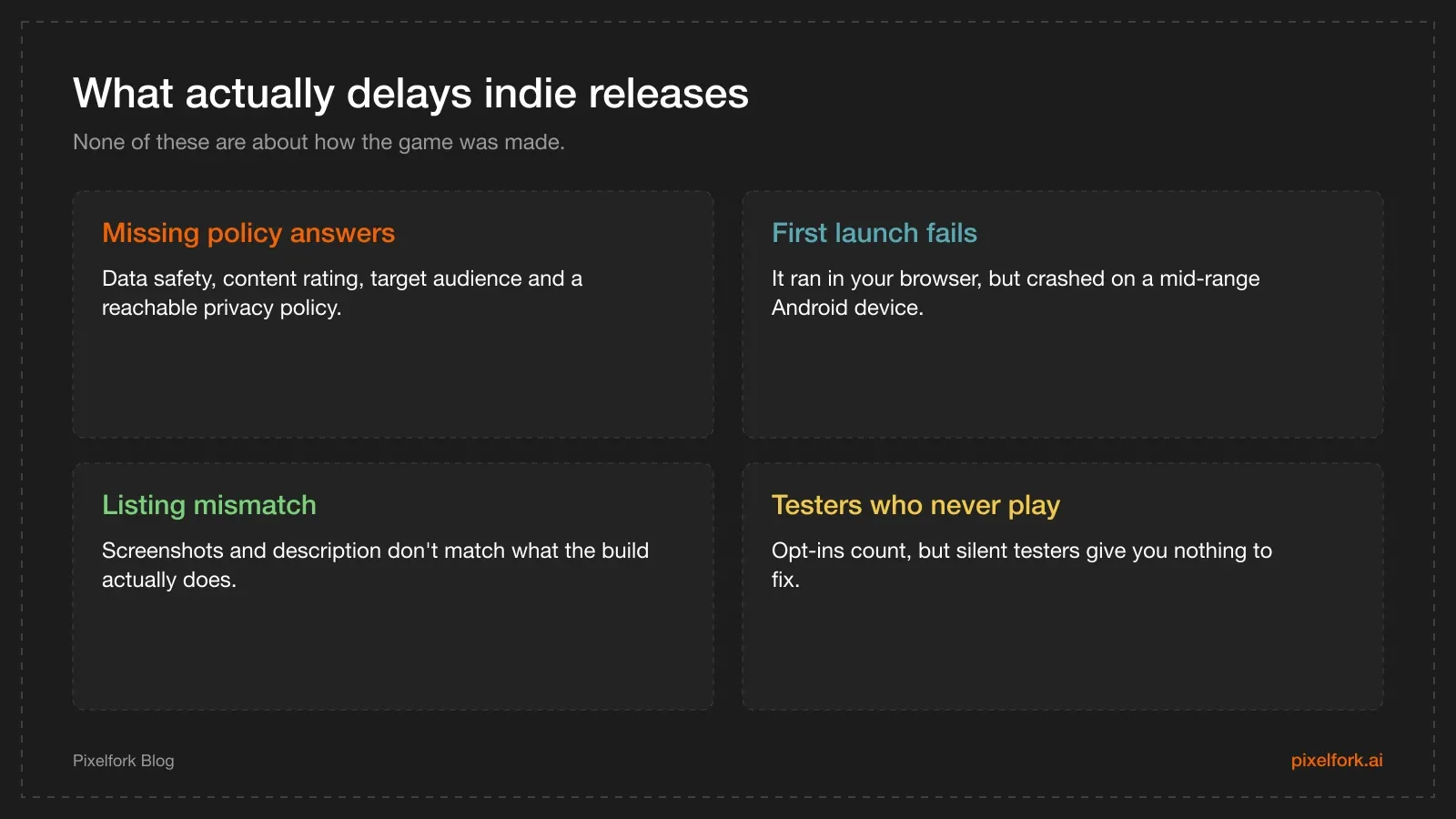
The usual suspects behind a rejected or delayed release.
Two more worth calling out:
- Placeholder content. Generated art or sound you don't have rights to, or "TODO" text left in a menu, is exactly the kind of thing a reviewer notices.
- Permissions you don't need. If your build requests something the game doesn't use, remove it before you submit — it makes the data-safety form harder and reviewers more suspicious.
Tips if you're publishing from Pixelfork
- Do device QA with the APK first. Uploading a broken build to a closed track wastes days of your 14-day window.
- Use the AAB for the track upload. That's the format the Console expects.
- Export the Android Studio project if you need policy-sensitive pieces, such as an ads consent flow or in-app purchases, before you go to production.
- Keep the playable link as your feedback channel. It costs nothing to publish, works in any browser, and republishing keeps the same URL.
The store listing checklist
Closed testing runs in parallel with the paperwork, so get the listing done while your testers play:
- Title and short description. The title carries the most weight in store search; the short description is the line people actually read.
- Full description. What the game is, how it plays, and who it's for — written for players, not for a keyword tool.
- Screenshots. At least two, ideally four to eight, taken from the real build. Phone screenshots first.
- Feature graphic and icon. The icon must match the one in your build.
- Category, tags and contact details.
- Privacy policy URL. Required whenever you collect data or use SDKs that do. A simple page on your own site is fine.
- Content rating questionnaire, target audience and content, data safety, and ads declaration.
Answer the questionnaires honestly and conservatively. Contradictions between your data-safety answers and what your app actually does are a common rejection reason — and if you later add an ad SDK, your answers change.
What to ask your testers
Twelve testers who say "nice game" teach you nothing. Send three questions with the opt-in link:
- Did it launch and run smoothly on your phone? (Tell me your phone model.)
- What did you think you were supposed to do in the first 15 seconds?
- What made you stop playing?
Question two is the one that finds design problems. If testers describe a different goal than the one you designed, your onboarding is broken — no amount of polish fixes that.
Collect answers anywhere simple: a Discord thread, a three-field form, or direct messages. Also watch the Play Console crash and ANR reports during the window; they'll show device-specific problems no one thinks to report.
A realistic timeline
- Day 0: app created in Play Console, AAB uploaded to a closed track, listing drafted.
- Days 1–3: testers invited and opting in. Expect to invite roughly twice the number you need.
- Days 3–14: feedback, crash fixes, new builds to the same track. Keep the testers opted in — that continuity is what counts.
- Day 14+: apply for production access, answering the questions about your app and your testing process.
- After approval: promote the build to production, then watch the vitals dashboard for the first week.
After production access
Getting to production isn't the end of the process:
- Watch Android vitals. Crash rate and ANR rate are the numbers Play uses to judge your app's quality.
- Ship small updates. A cadence of fixes tells both players and the store that the game is alive.
- Keep a testing track open. Promoting from closed to production for each update is safer than shipping straight to everyone.
- Only then think about monetisation. If ads or purchases are next, the Android Studio handoff is the path.
If your app is rejected
A rejection isn't the end of the process; it's a list of things to fix:
- Read the specific policy cited. Play's messages link to the exact policy page — start there rather than guessing.
- Fix the cause, not the symptom. Most first rejections are metadata problems: a data-safety answer that doesn't match the SDKs, a missing privacy policy, or screenshots that don't show the actual app.
- Reply through the appeal form if you genuinely believe it's a mistake, with specifics rather than frustration.
- Keep the testing track running while you sort it out, so your testers stay opted in.
FAQ
Do AI-generated games skip Google Play testing requirements?
No. Google's testing requirements apply to the developer account and the app, not to the tools you used. An AI-built game goes through the same closed testing, policy questionnaires and review as any other Android game.
What counts as a closed tester?
Someone you invited to the closed track — by email list or Google Group — who has opted in through the link you shared and stays opted in. Google's requirement for new personal accounts is at least 12 such testers, continuously opted in for 14 days.
Can I use the same AAB for closed testing and production?
Yes. A bundle promoted from a testing track to production is the same build. If you make changes, upload a new bundle with a higher version code.
Should testers install a sideloaded APK or use the Play testing link?
For Google's requirement, they need to be opted-in testers installing through Play. Sideloaded APKs are great for quick feedback rounds, but they don't count toward the closed-testing criteria.
What if I can't find 12 testers?
Ask in indie communities that run tester exchanges, and over-invite — some people never opt in. Until you reach the bar, use open channels such as a web playable to collect feedback and keep improving the game.
Does Pixelfork submit my game to Google Play for me?
No. Pixelfork produces the APK and AAB; creating the app, completing the listing, answering policy questions, running the test and applying for production are all done by you in Play Console.
Get the build right before Console day: make your game on Pixelfork, export an APK for device QA, then upload the AAB to a closed track.