Best Prompts for AI Mobile Games (Copy-Paste by Genre)
Copy-paste first prompts for runners, hypercasual, puzzle, arcade and platformer games — plus the follow-up messages that improve them without wasting credits.
The difference between a usable first result and a wasted generation is almost always the first message. Good AI game maker prompts name the genre, the camera, the one thing the player does, and the fact that it's for a phone.
This is a copy-paste library you can work from: a template, five genre starters, the follow-up messages that actually improve a game, and the changes you should never spend a generation on.
Prompting rules that save credits
Pixelfork's prompting guide is refreshingly blunt about this, and the rules generalise to most chat-to-game tools:
- Be descriptive in the first message. It sets the foundation: game type, visual style, setting and key mechanics.
- Don't paste a 900-word LLM prompt. Ask your favourite model for a short, descriptive prompt instead, then paste that.
- Iterate in small follow-ups. Each message builds on the existing game; you're not starting over.
- Use reference images. The Add Image button attaches a screenshot the AI can read — ideal for art direction or pointing at a UI bug.
- Mention assets with @. Anything you've uploaded to the Assets tab can be referenced by name.
- Pick Mobile / Tablet before generating. The platform choice is locked once the game is created.
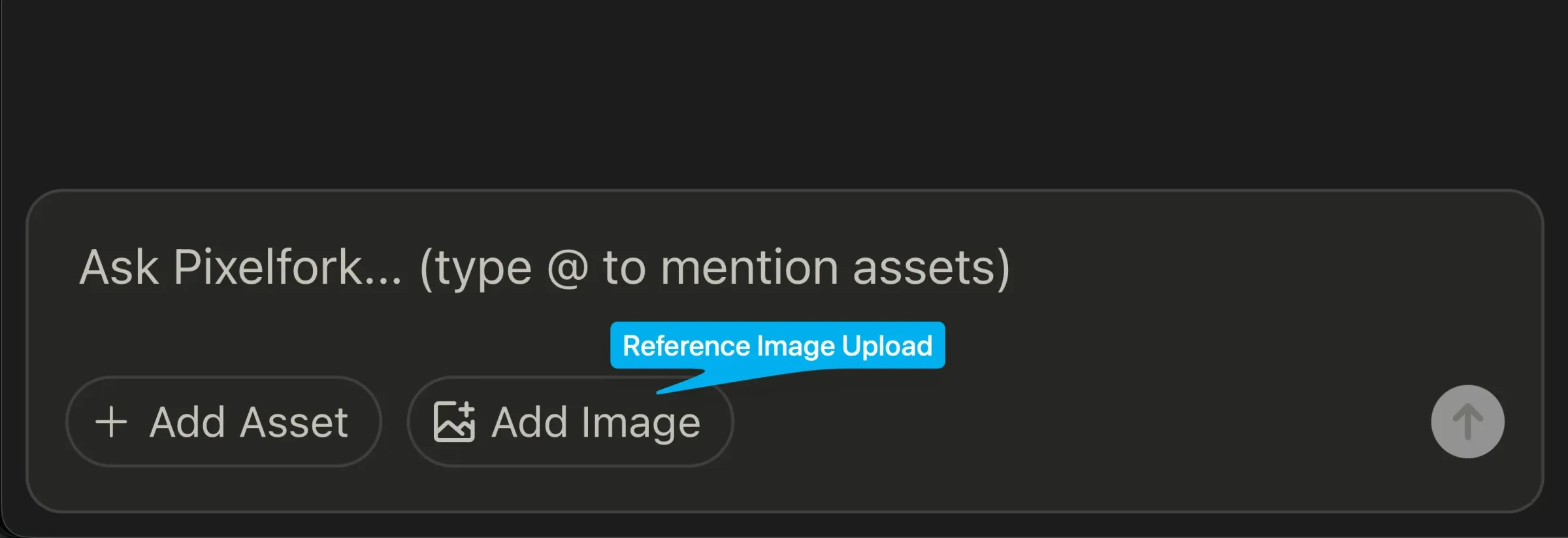
The chat box: attach a reference image, or type @ to pull in your own assets. Screenshot: Pixelfork chat box.
And the money rule: the first generation of a project costs 2 credits; each chat change costs 1. Playing the preview, browsing version history, editing code and publishing don't cost credits. So spend chat messages on structure, and tune numbers in the Mechanics Editor instead.
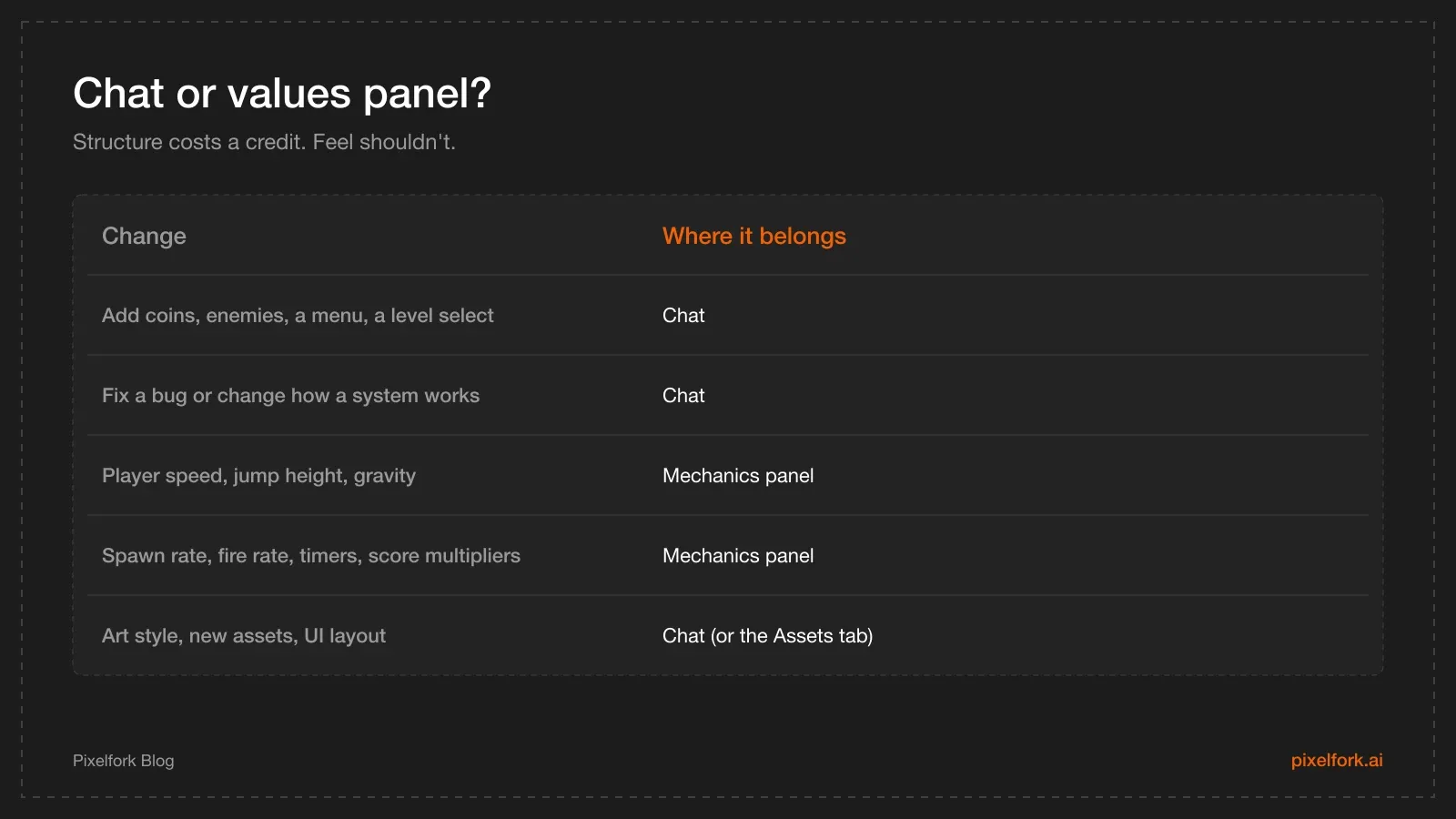
A simple rule that saves a lot of credits.
Anatomy of a strong mobile game prompt
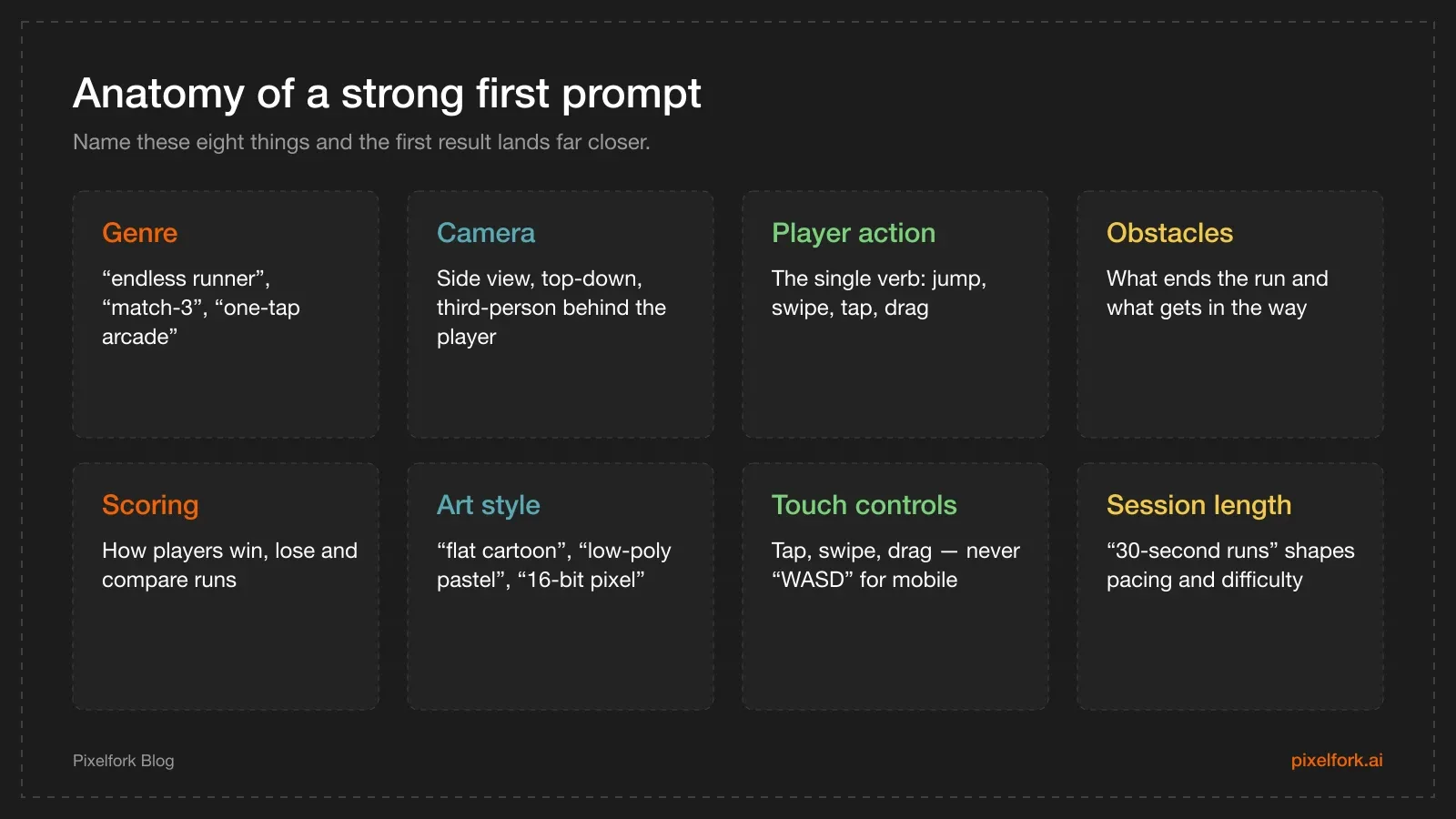
Eight blocks. You don't need all of them, but the first four matter.
A fill-in-the-blanks template:
Make a [genre] for mobile, [camera/perspective].
The player [one core action] using [touch control].
[Obstacles or enemies] and [what ends a run].
Score by [scoring rule].
Art style: [style], [palette or mood].
Runs should last about [session length].
Copy-paste prompts by genre
Endless runner
Starter prompt
Make a 3D endless runner for mobile with a camera behind the player.
The character runs forward automatically down three lanes; swipe left and right
to change lane and tap to jump.
Obstacles are barriers and moving carts; hitting one ends the run.
Collect coins for score, and speed increases slowly over time.
Art style: bright low-poly city, sunny afternoon.
Runs should last 30 to 60 seconds.
Follow-ups that pay off
- "Add a coin magnet power-up that lasts 5 seconds and appears rarely."
- "Show a clear game-over screen with the score, best score and a restart button."
- "Make obstacles visible at least one second before the player reaches them."
Tune in the panel, not chat: run speed, speed ramp, jump height, gravity, obstacle spawn rate. Full walkthrough: make an endless runner with AI.
Hypercasual one-tap
Starter prompt
Make a one-tap hypercasual game for mobile, side view.
A character bounces between two walls; tap anywhere to switch direction.
Spinning saw blades move across the screen; touching one ends the run.
Score one point per successful wall bounce, with a combo for five in a row.
Art style: flat minimal shapes, pastel background, thick outlines.
Sessions are 15 to 45 seconds.
Follow-ups
- "Add a short screen shake and a particle burst on each successful bounce."
- "Add a best-score display that persists between runs."
- "Increase blade speed slightly every 10 points."
Panel: bounce speed, blade speed, spawn interval, combo window. More: make a hypercasual game with AI.
Puzzle (match, sort or grid)
Starter prompt
Make a mobile puzzle game with a 7x7 grid of coloured gems, top-down view.
Tap two adjacent gems to swap them; matching three or more clears them
and new gems fall from the top.
The player has 20 moves to reach a target score shown at the top.
Art style: soft rounded gems, calm blue background, clear colour separation
that also works for colourblind players.
Follow-ups
- "Add a blocker tile that takes two matches next to it to clear."
- "Add a level-complete screen with stars based on moves left."
- "Prevent the board from starting with automatic matches."
Panel: grid size, move limit, target score, cascade speed. More: make a puzzle game with AI.
Arcade shooter (light twin-stick)
Starter prompt
Make a top-down arcade survival game for mobile.
Drag anywhere on the screen to move the player; the player fires automatically
at the nearest enemy.
Enemies spawn in waves from the screen edges and get faster each wave.
Three hits end the run; score is enemies destroyed.
Art style: neon shapes on a dark grid, high contrast.
Follow-ups
- "Add a brief invulnerability flash after taking a hit."
- "Every fifth wave, spawn one larger enemy that takes three hits."
- "Show wave number and health as simple icons at the top."
Panel: player speed, fire rate, bullet speed, enemy size, spawn rate, arena size.
Simple platformer
Starter prompt
Make a 2D side-scrolling platformer for mobile with a small fox character.
On-screen buttons: left, right and jump, with a double jump.
Floating platforms, spikes to avoid, and acorns to collect.
Reaching the flag ends the level; falling off the screen restarts it.
Art style: hand-drawn forest, warm autumn colours.
One short level for now.
Follow-ups
- "Add coyote time so a jump still works just after leaving a platform."
- "Add a moving platform in the middle section."
- "Add a level-complete screen with acorns collected out of the total."
Panel: move speed, jump height, gravity, platform speed. Related reading: building a 2D platformer character controller.
Prompts that usually fail
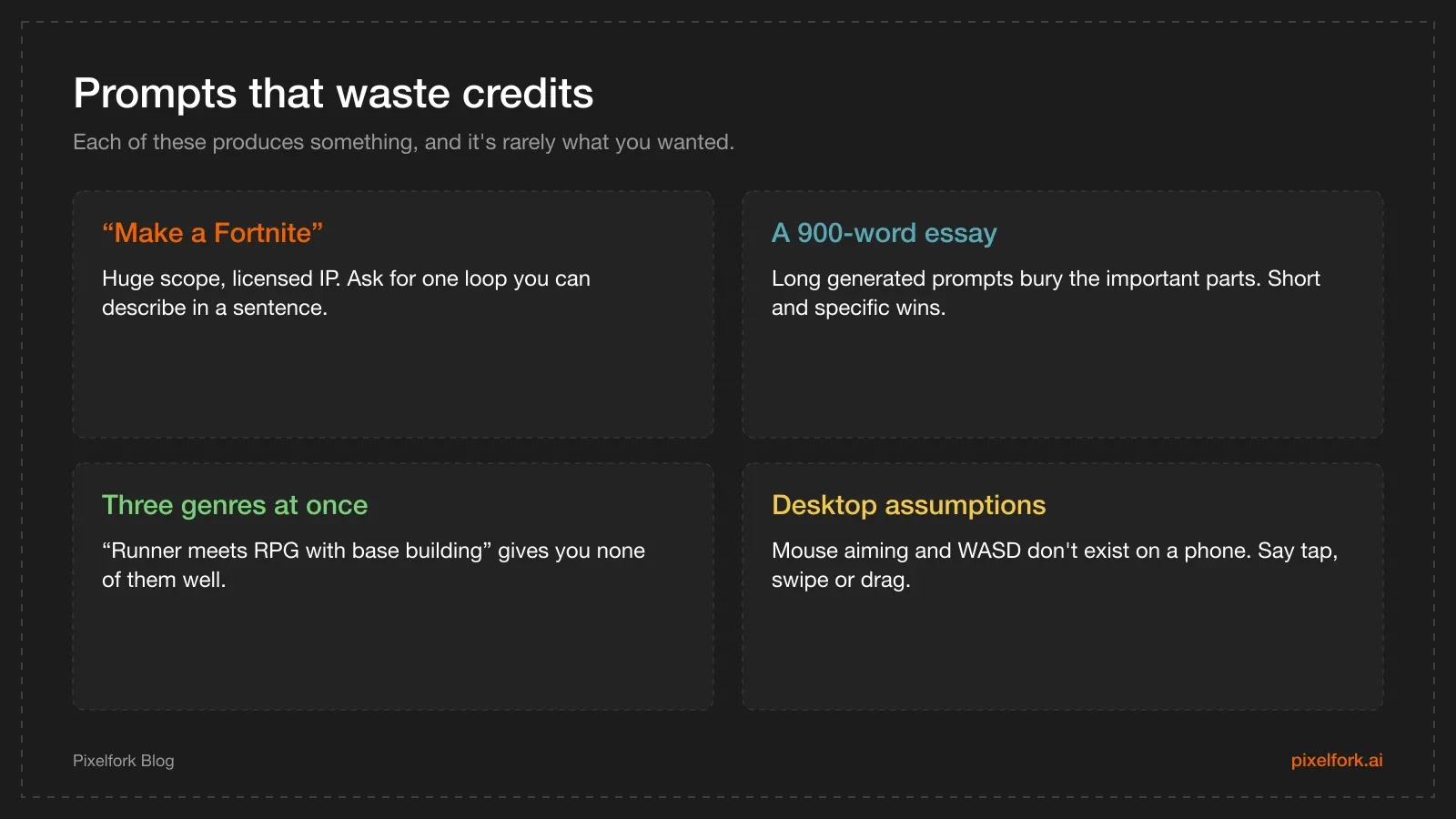
Four patterns to avoid, and the fix for each.
One more: naming a famous game as the spec. "Like Subway Surfers but with cats" sets an expectation nothing will meet, and copying a named game's characters or art invites a takedown. Describe the mechanic instead — that part isn't anyone's property.
A credit-aware workflow
- One strong first prompt (2 credits). Use the template above.
- Three to six structural follow-ups (1 credit each): missing feedback, game-over screen, one power-up, one difficulty rule.
- Move to the values panel for everything numeric. No credits, instant preview.
- Use version history if a change makes things worse — browsing and reverting are free.
- Publish a playable link and get five people to try it before you spend anything else.
That's the shape of a prototype that costs a handful of credits instead of a whole month's plan.
Follow-up prompts that fix common problems
Most first generations fail in predictable ways. These follow-ups fix them without restarting:
The game reads as desktop. "Replace all keyboard and mouse controls with touch: tap to jump and swipe left or right to move. Remove any on-screen instructions that mention keys."
Nothing tells the player they did well. "Add immediate feedback to every scoring action: a short particle burst, a small scale pop on the score number, and a sound."
There's no failure loop. "Add a game-over state that stops the game, shows the score and best score, and offers a single restart button that returns straight into play."
It's too hard immediately. "Start the game slower, and increase difficulty gradually: raise the speed by a small step every 15 seconds instead of continuously."
The UI is unreadable on a phone. Attach a screenshot and write: "On a phone this text is too small and overlaps the top edge. Increase the font size, keep the UI inside a safe margin, and move the score to the top centre."
The camera is wrong in 3D. "Move the camera behind and slightly above the player, looking forward, and keep the horizon in the upper third of the screen."
Prompting for art and assets
Art direction is where vague prompts hurt most. Three techniques:
- Name a concrete style, not a mood. "Flat vector with thick outlines and a four-colour palette" beats "cool and modern".
- Attach a reference image. The Add Image button takes a screenshot or a mood board; the AI reads it for style, not just content.
- Use your own assets. Upload them in the Assets tab and mention them with @ so they're used by name — the cleanest way to get a specific character or tile set into the game.
Keep the palette small and the contrast high. On a phone, readability is a gameplay feature, not a visual preference. Our 2D art pipeline notes cover keeping that consistent as the game grows.
A worked session
Here's how a focused build actually looks, message by message:
- First prompt (2 credits): the runner starter from above.
- "Add coins that spawn between obstacles and a coin counter in the top right." (1)
- "Add a game-over screen with score, best score and a restart button." (1)
- "Obstacles should be visible about one second before the player reaches them at current speed." (1)
- Mechanics panel (free): run speed 8 → 6.5, gravity up, jump height up slightly, spawn interval up.
- Playtest, revert one change via version history (free).
- "Add a magnet power-up that appears roughly every 30 seconds and lasts 5 seconds." (1)
- Panel again (free): tune the magnet radius and the new spawn value.
Six credits, one afternoon, and a game that's ready for a playable link. The pattern generalises: structure in chat, numbers in the panel, playtest between every step.
FAQ
Should I paste a long ChatGPT-generated prompt into an AI game maker?
Better not. Pixelfork's docs specifically recommend against extremely long LLM-generated prompts and suggest asking the model for a short, descriptive prompt instead. Long prompts bury the important constraints and produce muddled results.
How detailed should the first prompt be?
Detailed on the things that define the game — genre, camera, the core action, controls, fail state and art style — and quiet about everything else. Aim for four to eight lines.
Can I attach screenshots as style references?
Yes. Use the Add Image button to attach a reference; the AI reads it and uses it for visual direction. It's also the fastest way to point at a UI bug: attach a screenshot of the broken layout.
When should I stop prompting and use the Mechanics Editor?
As soon as the structure is right and you're only changing numbers. Speed, jump height, gravity, spawn rates, timers and score multipliers belong in the panel, where changes are instant and don't cost credits.
Do prompts work differently for 2D and 3D?
The structure is the same, but 3D prompts should name the camera explicitly — behind the player, top-down, isometric — and 2D prompts should say side view or top-down. Ambiguity here is the most common cause of a "wrong" first result.
How many credits does a prototype take?
It depends on how many structural changes you make. A focused build — one strong first prompt plus a handful of follow-ups — is a small number of credits; an exploratory session where you change direction repeatedly costs more. Keep numeric tuning out of chat and the total stays low.
Pick a starter prompt, open Pixelfork on Mobile / Tablet, and paste it in. Then tune the feel in the panel rather than the chat.