APK vs AAB for Indie Games: Which Build Do You Need?
APK installs on a phone; AAB is what Google Play expects. Here's the plain-English difference, a decision table and the indie workflow that uses both in the right order.
If you've just found an Export menu with two Android options, the question is simple: APK vs AAB — which one do you actually need? The short answer: an APK is for testing on devices, and an AAB is what you upload to Google Play.
This guide keeps it practical. No Gradle lecture, just the difference, a decision table and the order to do things in — whether your game came out of Unity, Godot or an AI game maker with Android export.
Plain-English definitions
APK (Android Package Kit) is an installable Android app file. Put it on a phone, open it, and Android installs it. Because it's not coming from the Play Store, the device will ask you to allow installs from unknown sources — normal, and reversible.
AAB (Android App Bundle) is a publishing format. It contains everything your app needs for every device configuration, and Google Play uses it to generate and sign the specific APK each device downloads. Google requires the bundle format for new apps on Play; see the App Bundle documentation.
The mental model that clears up most confusion: you build an AAB for Google; Google builds the APKs for players.
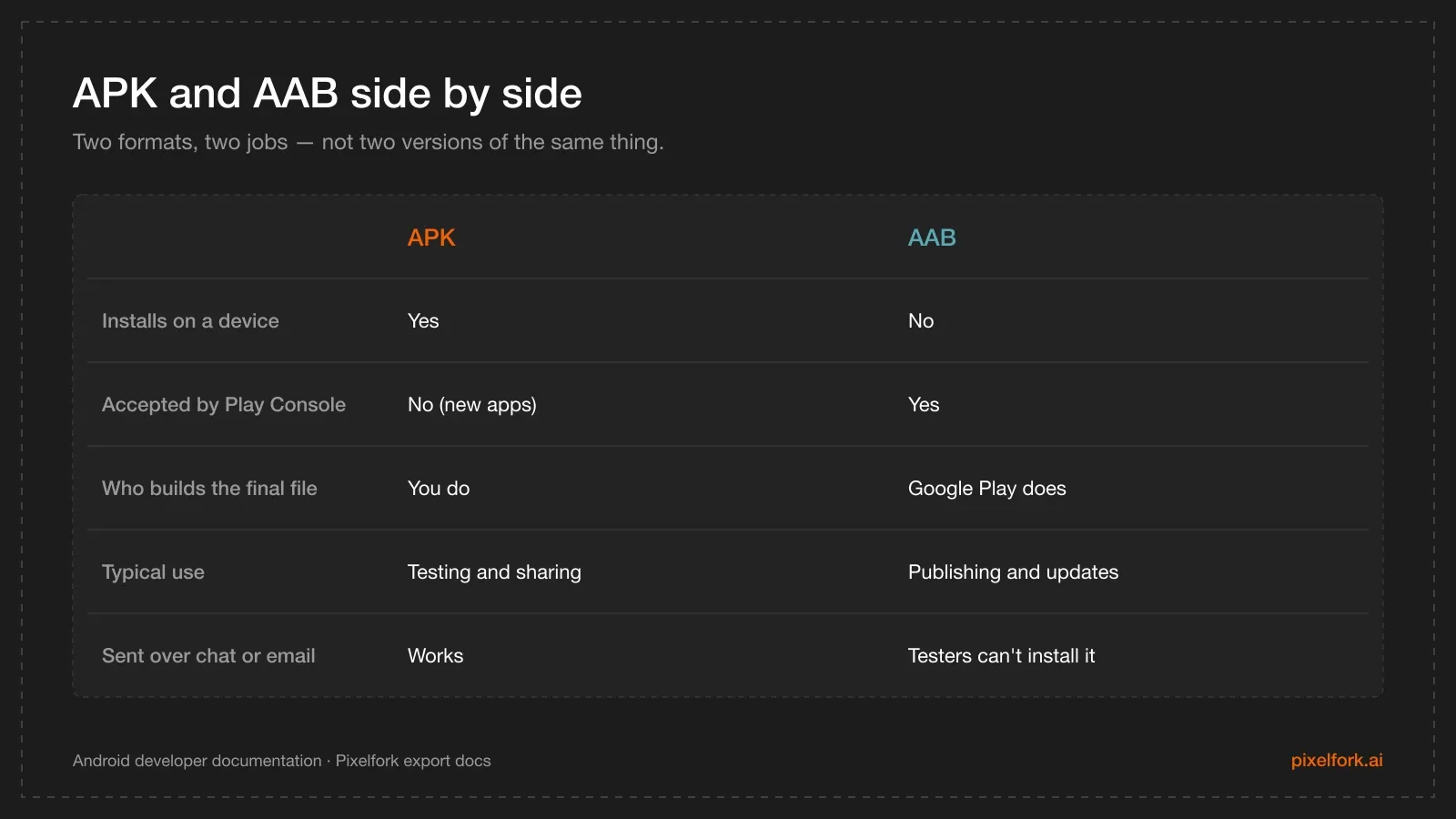
The practical differences between the two formats.
The decision table
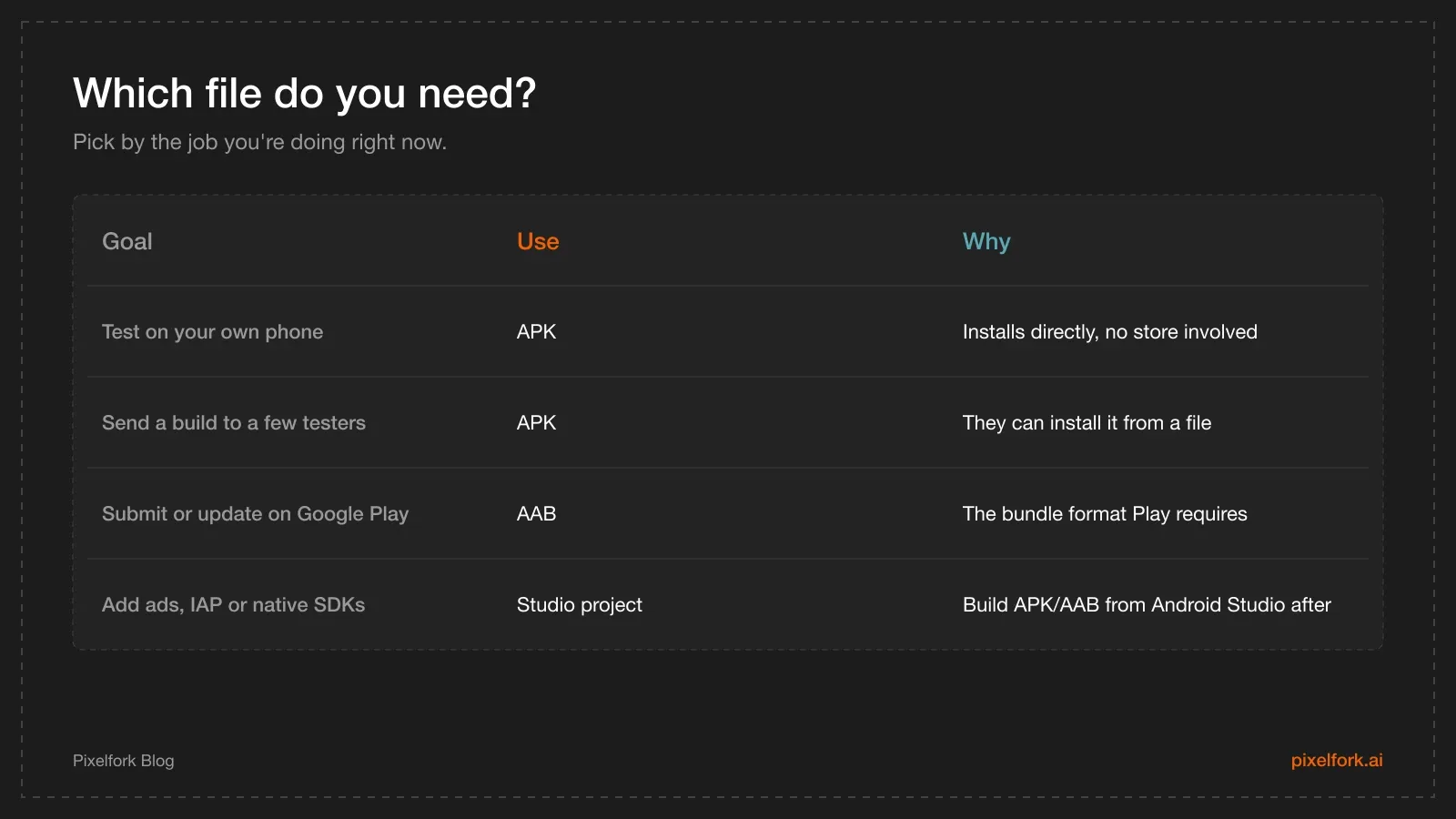
Pick the artifact that matches the job.
Three myths that waste an afternoon
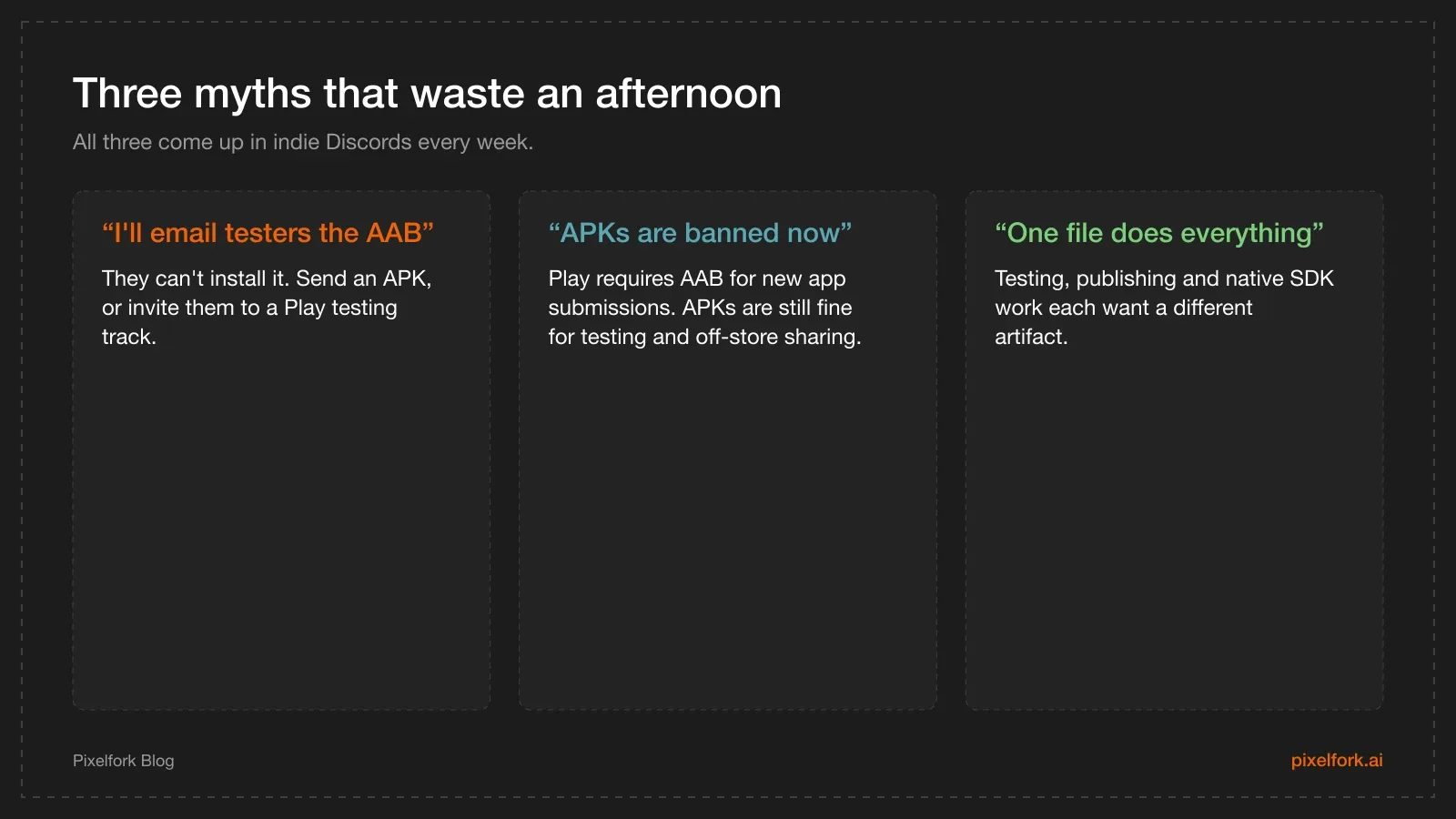
If you've hit one of these, you're in good company.
A fourth one worth naming: "my test APK is basically published." It isn't. A sideloaded APK doesn't appear on Play, doesn't get updates, and doesn't count toward Google's testing requirements for new personal developer accounts — that needs a real testing track, which we cover in Google Play closed testing for AI-built games.
How export works in Pixelfork
In the editor, click Export and choose the format. Both APK and AAB ask for the same two things before packaging:
- App name — what players see under the icon.
- App icon — PNG or JPG, square, at least 512×512 pixels.
Pixelfork then builds the file and downloads it. Transfer the APK to your phone to install it; take the AAB to the Play Console and attach it to a release. The details are in the APK and AAB export docs.
One note specific to AI-built games: the platform choice (Desktop or Mobile / Tablet) is made when the game is created and can't be changed afterwards, so start a game you intend to ship on Android as a Mobile / Tablet project.
Where the Android Studio project fits
Some things simply don't live in a web editor: ad SDKs, in-app purchases through Play Billing, Play Games Services, push notifications. For those, export the full Android Studio project, add the SDK there, and build your APK and AAB from Android Studio. That handoff is its own article: adding ads and IAP after an Android Studio export.
The practical indie workflow
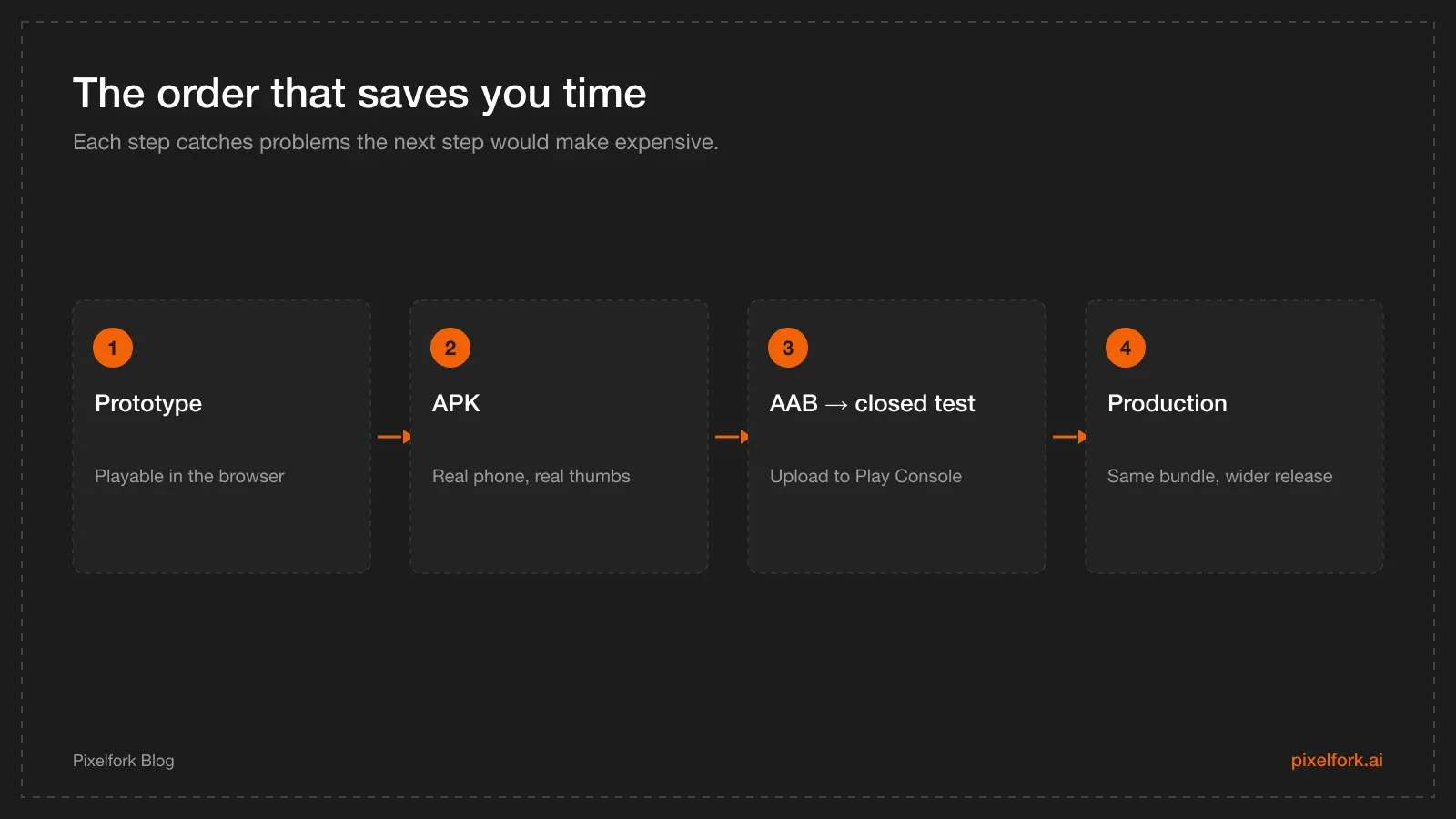
Prototype, test, then publish — in that order.
- Prototype in the browser. Fast iteration, no packaging.
- Export an APK and install it on a real phone. Check touch targets, frame rate on a mid-range device, first-launch experience, and whether the game is readable in sunlight.
- Fix what the device revealed. This is where most of the value is. Small performance work pays off more than new features.
- Export an AAB and upload it to a closed testing track in Play Console.
- Promote the same bundle to production when you're eligible and the feedback is good.
Keep the app name and icon consistent across builds, and bump your version for each upload — Play rejects a bundle whose version code it has already seen.
Signing, in plain language
Every Android app is signed with a cryptographic key, and Android uses that signature to decide whether an update really comes from you. Two practical rules follow:
- Keep your keys safe and backed up. If you lose the key for an app published outside Play, you cannot ship updates to existing installs.
- On Play, use Play App Signing. Google holds the app signing key and you keep an upload key; if the upload key is lost, support can help you reset it. That safety net is the main reason it exists.
For test builds you send to friends, the signature doesn't matter much — Android will simply warn about an unknown source. For anything on the store, it matters permanently.
Version codes and updates
Two fields travel with every build:
- Version code — an integer Play uses to order releases. Every upload needs a higher number than the last, or Play rejects it.
- Version name — the human-readable string ("1.0.3") players see.
A simple habit that avoids confusion: bump the version code for every single build you upload anywhere, even the ones that never reach production, and keep the version name for changes players would notice.
A sideloading checklist for testers
When you send an APK to testers, send these five lines with it:
- Download the file on the Android phone itself (not on a desktop and then AirDropped — that's where most confusion starts).
- Open it from the notification or the Files app.
- If Android warns about unknown sources, allow installs for the app you downloaded it with.
- Play for a few minutes, including a restart of the app.
- Reply with: did it launch, did anything look wrong, and did it ever feel slow?
That's the whole protocol. Testers who get a wall of instructions usually don't test.
What to actually test on device
The point of an APK isn't to prove the game exists — it's to find what the browser hid:
- First launch. Cold start on a mid-range phone, with no cache.
- Touch accuracy. Are the buttons and pieces big enough for a thumb?
- Frame rate under load. The busiest moment, not the menu.
- Screen shapes. Notches, rounded corners and tall aspect ratios clipping UI.
- Interruptions. A phone call or backgrounding the app, then returning — does it resume or restart?
- Battery and heat over a ten-minute session, if your game runs 3D continuously.
Each of those has fixes that are cheap now and expensive after launch. Our mobile performance checklist covers the ones that need code.
What about distributing outside Google Play?
Play isn't the only Android channel, and APKs matter more here:
- itch.io accepts APK uploads, which makes it a natural home for jam builds and demos — see publishing on itch.io and Steam.
- Direct downloads from your own site work, as long as you tell players about the unknown-sources prompt.
- Other Android stores have their own formats and rules; check each one before assuming your Play bundle transfers.
In all of those cases, you're responsible for signing and for hosting updates — there's no Play Console doing it for you.
FAQ
Can I publish an APK to Google Play?
Not for a new app. Google Play requires the Android App Bundle for new app submissions, and generates the device-specific APKs itself. APKs remain useful for testing and for distribution outside Play.
Why can't my friends install the AAB I sent them?
Because an AAB isn't an installable app — it's a bundle for Google Play to process. Send them an APK instead, or add them to a Play testing track so they install through the Play Store.
Do I need a different icon for APK and AAB?
No. Both exports ask for the same app name and icon (PNG or JPG, square, at least 512×512). Using the same assets keeps your test builds and store listing consistent.
Should I always export the Android Studio project?
No. Only when you need native integrations — ads, in-app purchases, Play Games Services, analytics SDKs. If your game is a straightforward premium or free release without those, the AAB export is enough.
Is the AAB format only for big studios?
No. It's the standard submission format for everyone on Play, from solo developers to large studios. The tooling does the heavy lifting; you upload one file.
Which format should I use for a game jam or an itch.io release?
APK. Distribution outside Google Play doesn't use bundles, and players can download and install an APK directly — the same way many itch.io releases ship.
Export an APK today to see how your game really feels on a phone, then switch to AAB when you open the Play Console. Build your game on Pixelfork.