Every beginner hits this fork, and most of them lose a week to it. Godot vs Unity is the most argued-about decision in hobbyist game development, and the honest answer is that both will make your game. The difference is what they cost you — in money, in setup time, and in how long it takes before something is actually moving on screen.
This guide compares them on the things you will feel in your first month: licensing, 2D, 3D, mobile export and the learning curve. It also covers the option that most "which engine" articles skip entirely — not installing an engine yet.
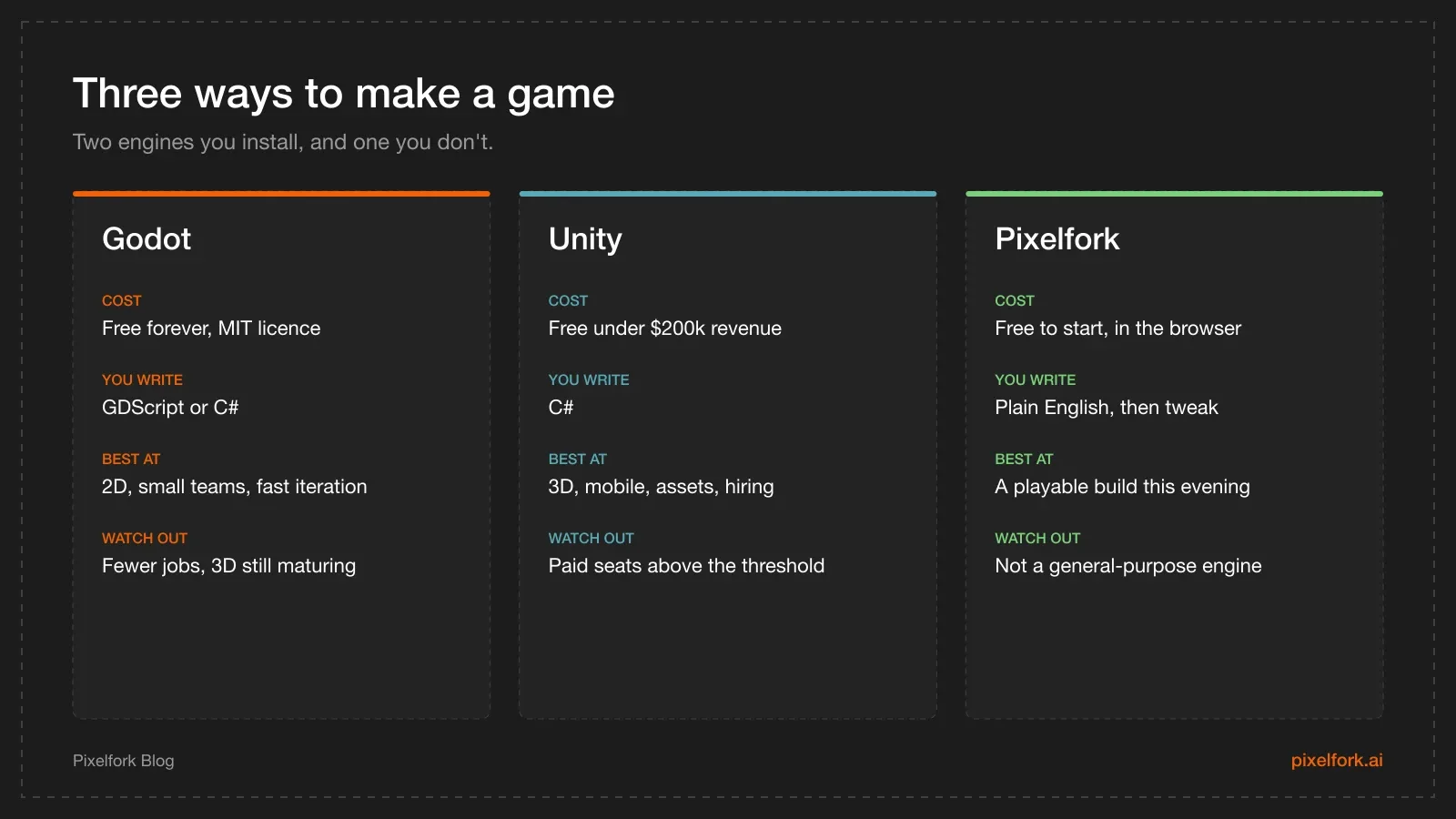
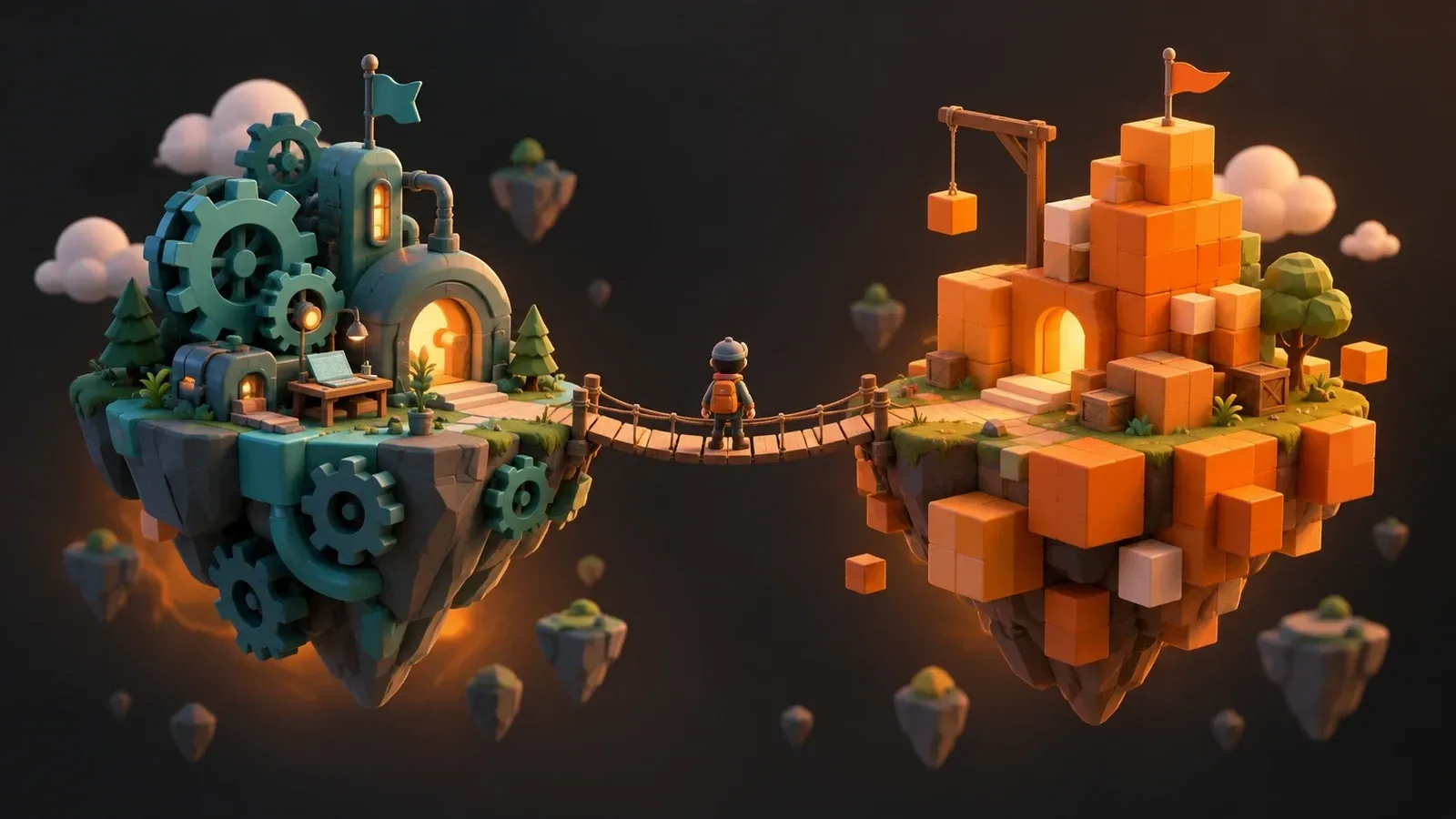
Two engines you install, and one that runs in a browser tab.
The short answer
If you want the decision without the reasoning:
- Making a 2D game, solo, for fun or for itch.io? Godot. It is free forever, the 2D tooling is genuinely better, and the editor opens in about two seconds.
- Making a 3D game, or a mobile game you intend to monetise, or hoping to get hired? Unity. The 3D pipeline is more mature, every ad network ships a Unity SDK first, and studios advertise for Unity developers.
- Not sure the idea is even fun yet? Neither. Build a rough playable version somewhere faster and find out, then bring the idea to an engine once it has earned the commitment.
That last one is not a dodge. Most abandoned projects die before the fun is ever tested, and installing a multi-gigabyte editor is a strange first step for an idea you have not validated.
Licensing: the part that actually bites
This is where the two genuinely differ, and where outdated advice does the most damage.
Godot is MIT licensed. Free, open source, no revenue ceiling, no royalties, no seat cost, ever. You can ship a commercial hit and owe nothing. The licence also means nobody can retroactively change the deal on a game you already released — a real consideration after the last few years.
Unity is a seat-based subscription. Unity Personal is free while your organisation is under $200,000 USD in annual revenue and funding. Above that, you move to Unity Pro, which at the time of writing is $2,310 per seat per year after a 5% increase that took effect on 12 January 2026.
One correction worth making, because it still circulates: the Runtime Fee no longer exists. Unity announced the per-install charge in 2023, and cancelled it entirely in September 2024 before it ever took effect — including for games made with Unity 6. If someone tells you Unity charges per install, they are describing a policy that was withdrawn. Check Unity's own pricing page and Godot's licence before you commit money, because these terms change.
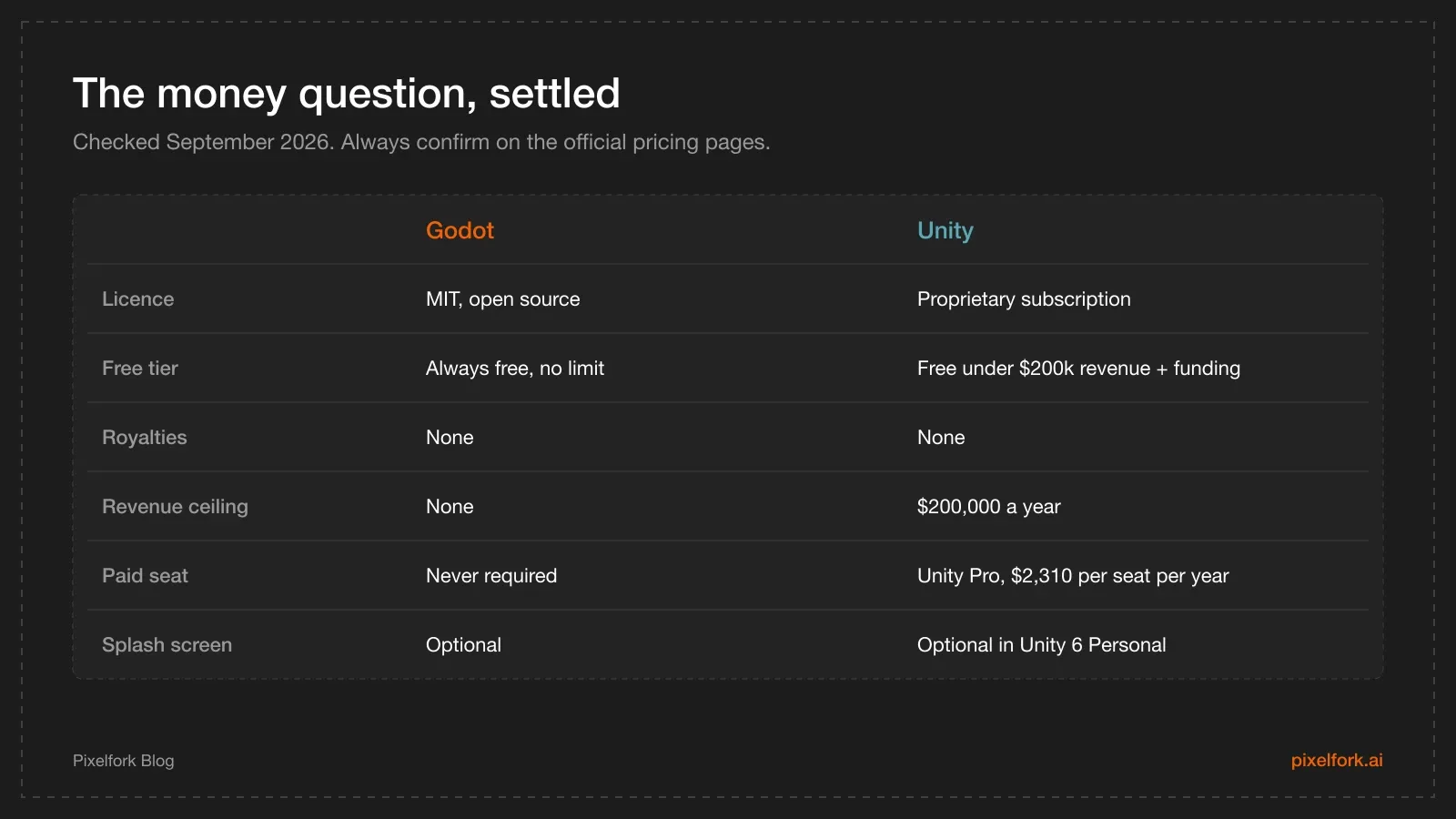
Both are free to start. Only one stays free at every scale.
For a solo developer or a small team, the practical translation is simple: you will almost certainly never pay Unity anything, because you will almost certainly not clear $200,000. The licence difference matters if you plan to build a studio, or if the principle of it matters to you.
Godot vs Unity for 2D
Godot wins this, and not by a small margin.
Godot has a dedicated 2D renderer with its own node types, its own coordinate system and pixel-snapping options built in. You set the texture filter to nearest, set an integer stretch scale, and your pixel art is crisp. It behaves like a 2D engine because it is one.
Unity's 2D support is a layer over a 3D engine. It works — plenty of excellent 2D games shipped in Unity — but you spend more time on setup: pixels-per-unit values, the Pixel Perfect Camera component, sprite import settings per asset. None of it is hard, and all of it is friction you do not hit in Godot.
Godot's other 2D advantage is iteration speed. The editor launches almost instantly and scene changes apply immediately, which matters enormously when you are tuning a jump arc for the fortieth time. If you are at that stage, our walkthrough of building a 2D platformer character controller covers what you are actually tuning, and the 2D art pipeline notes cover keeping the art consistent while you do it.
Godot vs Unity for 3D
Unity wins this one, and again it is not particularly close.
Godot 4 made a genuine leap in 3D — the current stable release is 4.7.2, and the 4.7 "Director's Cut" release in June 2026 continued a steady run of rendering improvements. It is a capable 3D engine now. But "capable" is not the same as "mature".
Unity's advantages in 3D are cumulative and boring: lighting and global illumination that has been debugged against thousands of shipped titles, a profiler built for finding frame drops on real devices, render pipelines with documented answers to almost any problem you will hit, and tutorials for every specific thing you want to build. When your shadows look wrong at 11pm, the difference between the two engines is whether somebody has already written up your exact problem.
If you are heading into 3D either way, our notes on 3D level design that guides players apply regardless of which editor you open.
Mobile and web export
Both engines export to Android and iOS. Two practical differences decide most mobile projects:
Ad networks and SDKs favour Unity. AdMob, ironSource, AppLovin and the analytics tools all ship official Unity packages, usually first and usually best-documented. Godot integrations exist and many are good, but more of them are community-maintained, which means you own the problem when one breaks against a new Android API level. If monetisation is the plan, read our ad mediation explainer — that stack is markedly easier to assemble in Unity.
Godot has a specific C# limitation on web. Godot supports both GDScript and C#, but C# projects still cannot export to the web platform. If browser builds matter to you — and for sharing a prototype, they matter a lot — either write that project in GDScript or plan to export to desktop and mobile only. This catches people out well after they have committed to a language.
Whichever you choose, performance work on phones follows the same rules in both; our guide to optimising mobile game performance is engine-agnostic on purpose.
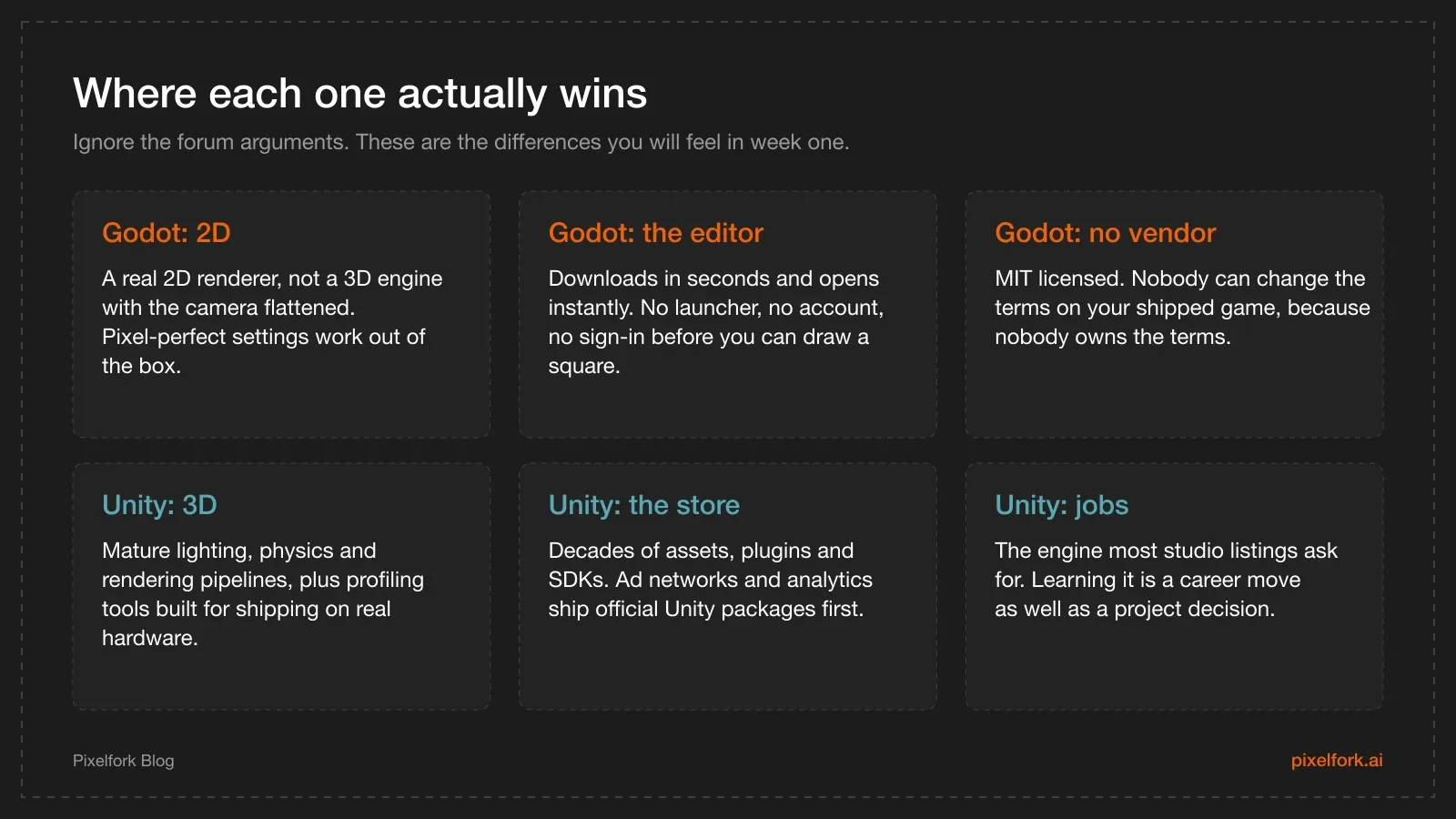
Three things each engine is genuinely better at.
Learning curve and community
Godot is easier to start. GDScript is a Python-like language designed for the engine, the node system is conceptually simple, and the editor does not hide anything behind a launcher and an account.
Unity is easier to continue. It has more tutorials, more Stack Overflow answers, more YouTube series and more asset packs than any other engine, and C# is a genuinely useful language outside game development. If you have ever taught yourself something by searching your error message, Unity's volume of material is a real advantage. If you want a gentler on-ramp to it specifically, we have a beginner's guide to the Unity engine.
The hiring difference is worth stating plainly: studio job listings ask for Unity far more often than Godot. If this is a hobby, ignore that completely. If it is a career plan, it is possibly the strongest single argument in the comparison.
The third option: don't install either one yet
Here is the part the Godot vs Unity debate tends to skip.
Both of these are professional engines that assume you already know what you are building. You download several gigabytes, work through a tutorial, learn a scene system and a scripting language — and at the end of a week you have a cube that moves. Meanwhile the actual question, is this game fun, is still completely unanswered.
If you are searching for a game engine without coding, or for a Unity alternative or Godot alternative because the setup itself is the obstacle, the useful move is to test the idea before you commit to a toolchain. Pixelfork is built for exactly that gap: you describe the game in plain English, it builds a playable version in the browser, and you tune the mechanics from there. Nothing to install, and you get a shareable link the same evening — which means you can put the idea in front of real people while it is still cheap to change.
We should be equally clear about what it is not. Pixelfork is not a general-purpose engine, and it will not replace Godot or Unity for a large custom 3D project, a console port or a title with bespoke engine-level systems. What it does replace is the worst part of starting: the week between "I have an idea" and "I can play something".
The two approaches compose well. Prove the loop is fun in a browser, write down what you learned in a game design document, and then pick an engine — with a validated design and a much better-informed answer to this entire comparison. If the no-code route turns out to be all you need, our guide to making a mobile game without coding takes it further, and what an AI game development platform actually is explains the category.
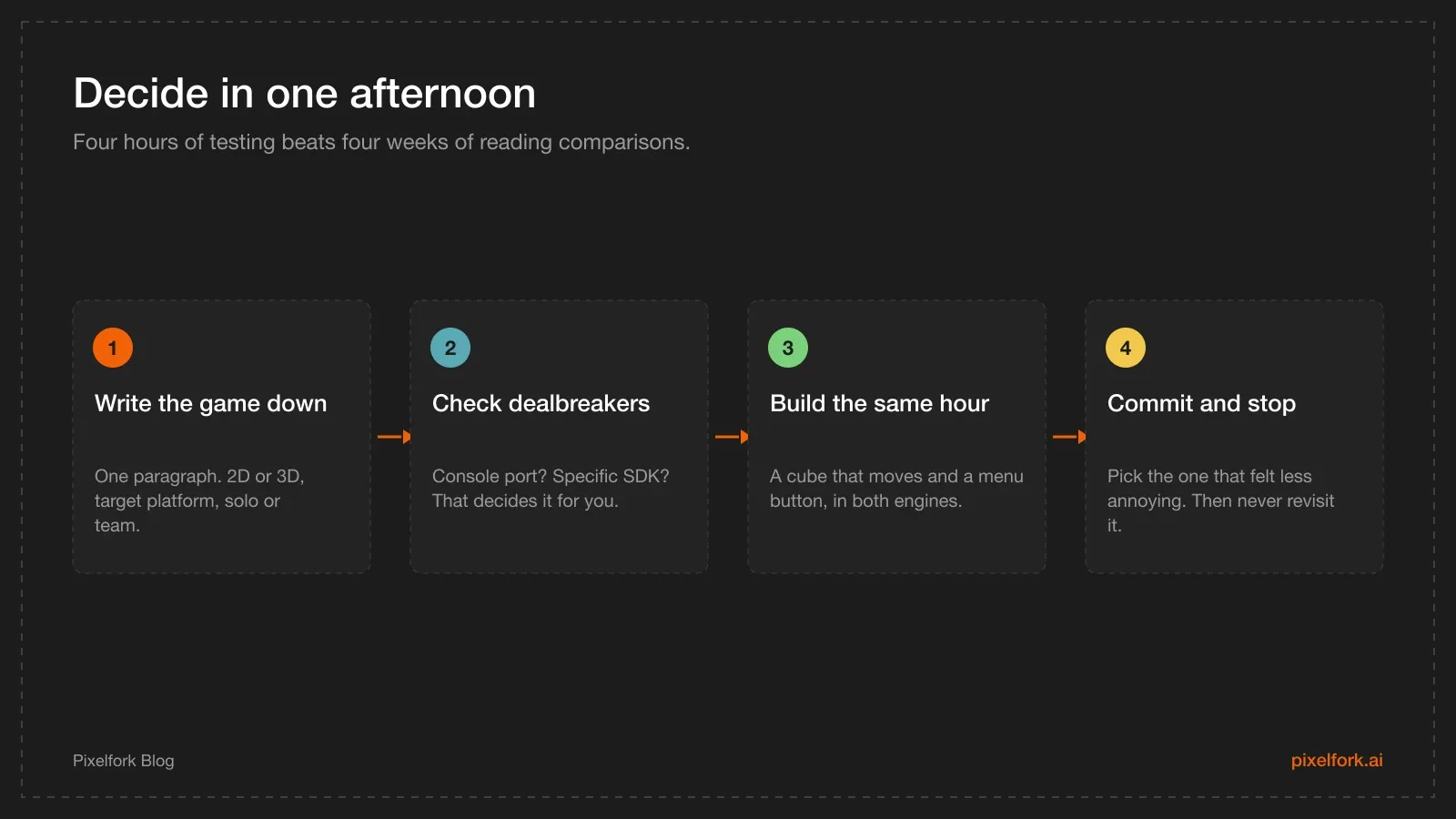
Test both in an afternoon rather than reading about them for a month.
How to actually decide
Stop reading comparisons — including this one — and run the test:
- Write the game down in one paragraph. 2D or 3D, target platform, solo or team, commercial or not. Most of the decision is already contained in those four facts.
- Check for dealbreakers. Do you need a console port, a specific ad SDK, a C# web build, or a particular plugin? A single hard requirement ends the debate immediately.
- Build the same hour-long prototype in both. A shape that moves with the keyboard, a collision, and a button that restarts the scene. You will form a strong preference within about forty minutes.
- Commit, and then stop thinking about it. Both engines can ship your game. The switching cost is real and the remaining difference is not worth a second week.
Whatever you pick, publishing works the same way afterwards. Our guide to publishing on itch.io and Steam applies to builds from either engine.
FAQ
Is Godot better than Unity?
For 2D games, solo projects and anyone who wants zero licensing risk, yes. For 3D, mobile monetisation and employability, Unity is still ahead. Neither is better in general, which is exactly why the argument never ends.
Which is easier for beginners, Godot or Unity?
Godot is easier to start: a small download, an instant editor and GDScript, a language designed to be readable. Unity is easier to keep going with, because there is far more tutorial material and community support when you get stuck.
Is Godot or Unity better for 2D?
Godot. It has a purpose-built 2D renderer rather than 2D features layered on a 3D engine, and pixel-perfect rendering needs less configuration to get right.
Does Godot or Unity perform better?
At the scale a solo developer works at, your own code will be the bottleneck long before either engine is. Unity has the more mature profiling and optimisation tooling for heavy 3D scenes on mobile hardware; Godot is very efficient for 2D.
Does Unity still charge a fee per install?
No. Unity announced the Runtime Fee in 2023 and cancelled it in September 2024, before it ever applied — including for Unity 6. Unity is billed per seat, and Unity Personal is free below $200,000 in annual revenue and funding.
Can I switch engines later?
Your art, audio, design and — most importantly — what you learned about what makes the game fun all transfer. The code does not. Switching mid-project usually costs weeks, which is why the four-hour test above is worth doing properly up front.
What about Unreal Engine?
Unreal is the third major option and excels at high-fidelity 3D, but it is heavier to learn and charges a royalty above a revenue threshold rather than a seat fee. For a first project, Godot or Unity is the more practical starting point.
The fastest way to end a "which engine" debate is to have something playable to argue about. Describe your idea, get a working build in your browser, and share the link before you commit a single gigabyte of disk space — that is what Pixelfork is for. Once the idea has proven itself, come back to this page and pick the engine that fits the game you now know you are making.